


Driveology®
4.4436.00 Reviews
App Specs
- Version
- fbfs-v2.2.0.0-96254-g35a7879-prod
- Updated On
- License
- Free
- Downloads
- 50,000+
- Developer
- FBL Financial Group, Inc
- Categories
- Auto & Vehicles
- Platform
- Android
Screenshots
 Analysis by AppCompare
Driveology® is a focused driving app from FBL Financial Group, Inc., built around the idea that safer driving becomes more useful when it is observed over time rather than judged from one memorable journey. After spending time with it, my view is clear: it is most valuable for drivers who want a practical way to reflect on their habits, while it is less convincing for anyone expecting a full navigation tool, a roadside assistant, or a broad automotive utility suite.
The app is free, rated for Everyone, and sits in the Auto & Vehicles category. Its public reception is encouraging, with a 4.4 average from around 910 ratings and more than 50K installs. Those figures suggest that it has found a real audience without pretending to be something larger than it is. The central experience is deliberately narrow: Driveology®, described in the store as “The Science of Safe Driving,” gives attention to how a person drives instead of simply helping that person get somewhere.
What using Driveology® feels like in everyday driving
The first important distinction is that this is not an alternative to Google Maps, Apple Maps, or a dedicated navigation app. I would not open it when I need the fastest route, live traffic, parking information, or a detailed trip plan. Its purpose is closer to creating a mirror for driving behavior. That makes it a better companion for routine travel than a replacement for the tools most people already use behind the wheel.
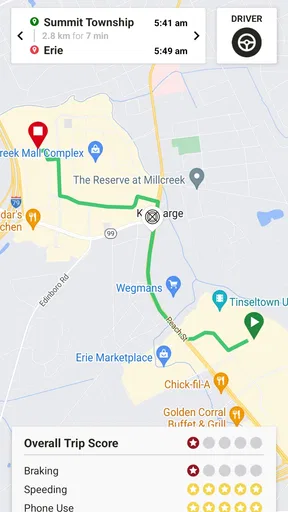
A realistic example is a weekday commute. I might leave home in a hurry, spend part of the trip following slow traffic, and arrive believing the drive was ordinary. A safety-focused app can make that routine journey more revealing by encouraging me to think about the decisions hidden inside it: whether I tend to accelerate sharply, brake late, or allow distractions to affect my attention. The value is not in turning one commute into a performance contest. It is in noticing patterns that are easy to dismiss when they happen one at a time.
That change in perspective is Driveology®’s strongest quality. Many driving tools concentrate on the vehicle, the road, or the destination. This one puts the driver’s conduct at the center. I found that framing more useful than a generic reminder to “drive carefully,” because it gives the idea of safe driving a personal context. When an app is connected to journeys I actually make, the advice feels easier to apply than broad safety slogans.
There is also a useful psychological trade-off here. A driver who likes feedback may become more deliberate about leaving space, avoiding abrupt maneuvers, and keeping attention on the road. At the same time, feedback can become distracting if the user starts checking the phone too often or worrying about every small change in a score. My practical advice is to treat the app as something to review before or after driving, never as a dashboard to watch while moving.
A safety tool rather than a general car companion
Driveology® makes sense when the goal is behavior awareness. It is not the right download if your main need is vehicle maintenance, fuel-price comparison, insurance claims, public transit, or emergency assistance. The Auto & Vehicles label may sound broad, but the app’s identity is much more specific. I would describe it as a safe-driving companion rather than an all-purpose motoring app.
Worth Reading Before You Choose

EA SPORTS FC Mobile 26 Is a Bigger Football Game, but It Takes Time

Flipboard Shows What News Apps Must Do Beyond the Feed

Switching to Android Auto Means Rethinking Your Driving Routine

Google Calendar Makes a Crowded Week Easier to Manage

Ludo King Makes the Most of the Minutes Between Plans

Baby Panda World Brings Quick Play to Modern Phones, but Its Game Library Feels Busy
That narrow focus is a strength because it keeps the central message understandable. A crowded app full of fuel logs, repair reminders, route planning, and vehicle specifications could easily bury the safety purpose. Here, the idea is easier to explain to a new user: use your driving history as a chance to build better habits. For people who appreciate a single-purpose tool, that clarity matters.
It also makes the app suitable for households where more than one person wants to think about driving habits. A new driver could use it as a prompt to develop consistency, while an experienced driver might use it to challenge the assumption that years behind the wheel automatically mean every habit is safe. I would still introduce it as a reflection tool, not as a strict judge. The best results come when the user is willing to learn from the feedback rather than defend every trip.
The practical strengths that matter most
The first strength is continuity. Safe driving is not a single decision made during a lesson; it is a collection of small choices repeated across ordinary trips. A tool that encourages ongoing attention can be more useful than a one-time article about defensive driving. I especially like this approach for people who already know the basic rules but want help turning them into habits.
The second strength is its potential to make invisible behavior discussable. It is easy for a driver to say, “I am careful,” because carefulness is a general self-image. It is harder, and more productive, to ask whether that self-image matches what happens during rushed errands, congested traffic, or long familiar routes. Driveology® gives users a reason to examine those situations instead of relying only on memory.
The third strength is accessibility. It is free, and its Everyone content rating makes it approachable for a broad audience. That does not mean every driver will enjoy the experience, but it lowers the barrier for someone who wants to try a safety-oriented app without committing to a purchase. The current release is identified as fbfs-v2.2.0.0-96254-g35a7879-prod, and it requires Android 10 or later, so compatibility should be checked before installing on an older phone.
That Android requirement is a small but meaningful detail for families with mixed devices. A person using a recent Android phone should be in the intended range, while someone keeping an older handset may need to consider an alternative. I would not replace a working phone just for this app. Its benefits are behavioral, not essential enough to justify hardware changes.
Where the experience can become less comfortable
The biggest limitation is that a driving-behavior app depends on the user accepting observation and feedback as part of the experience. Some people will find that motivating; others will feel monitored or judged. If you dislike tracking-oriented tools in general, Driveology® may create friction before its safety message has a chance to help. That reaction is not a minor detail, because willingness to engage consistently is central to the app’s usefulness.
There is also a risk of overinterpreting the feedback. Driving conditions are not identical from one trip to another. Heavy traffic, poor weather, road construction, unfamiliar streets, and the behavior of other drivers can all change what a journey feels like. I would avoid treating any single result as a complete verdict on driving ability. The more sensible approach is to look for recurring tendencies and then connect them to a specific improvement, such as leaving more following distance or reducing rushed starts.
Another point of friction is attention management. Any app associated with driving has to be used responsibly. I would set it up before leaving, keep the phone out of reach while the car is moving, and review information only after parking. If the app encourages a driver to interact with the screen during a trip, that undermines the very safety goal it is meant to support. The safest workflow is deliberately boring: prepare first, drive without touching the phone, reflect later.
Compared with a navigation app, Driveology® offers less immediate utility during a journey. Navigation software answers a direct question—where should I turn next?—while this app is more useful over repeated use. Compared with a vehicle-management app, it is less concerned with the car’s mechanical life. Compared with a driving course, it may be easier to revisit in daily life but cannot replace instruction, supervised practice, or professional help after a serious incident.
That comparison helps define its place. I would use navigation for directions, a vehicle app for maintenance information, and Driveology® for personal driving awareness. These tools solve different problems. Expecting one of them to replace the others is likely to lead to disappointment.
Who will get the most from it
I think Driveology® is a particularly good fit for people who commute regularly, drive for family responsibilities, or want a structured reminder to improve gradually. Repetition is important here. Someone who drives the same routes often has enough routine for patterns to become visible, and that makes the app’s safety focus easier to apply.
It may also suit parents or mentors who want to encourage safer conversations with a newer driver. I would use it as a starting point for questions rather than as a tool for arguments: What happened on that trip? Was the route unusually difficult? What could make the next journey calmer? That tone matters. Feedback works better when it leads to a practical adjustment instead of embarrassment.
Drivers who enjoy self-improvement tools may appreciate the app even without a specific problem. Small improvements can be worthwhile, especially for people who recognize that familiarity sometimes creates complacency. A driver who normally feels confident may benefit from reviewing the moments when confidence turns into rushing or reduced attention.
On the other hand, I would skip it if you want a rich map, an extensive vehicle database, or a service that handles every part of car ownership. I would also be cautious about recommending it to someone who is likely to check the phone while driving. In that case, the safer choice is to avoid adding another reason to interact with a screen and focus on established hands-free habits instead.
How I would build it into a safer routine
My preferred workflow begins before the first trip. I would install and configure the app while parked, confirm that the phone meets the Android 10 minimum, and decide when reviews will happen. Making that decision in advance prevents the common mistake of opening a driving app at an unsafe moment. The app should support the driving routine, not compete with it.
Next, I would give it enough ordinary journeys to make the feedback meaningful. A single short errand can be unusual, especially if traffic or road conditions are different. Repeated commutes, school runs, and familiar shopping trips provide a better foundation for identifying habits. I would avoid changing everything at once; choosing one behavior to improve makes the process more realistic.
For example, if I notice that rushed departures are a recurring issue, I might leave a few minutes earlier and concentrate on smoother starts. If following distance is the concern, I would make that the focus of the next several drives. This is more useful than trying to achieve a perfect result immediately. Safe driving is easier to sustain when the goal is specific and achievable.
A less obvious benefit is the opportunity to compare intention with circumstance. I may believe I drive calmly during the week but become less patient when late for an appointment. Reviewing journeys around different situations can reveal that the problem is not a general lack of care but a predictable trigger. Once the trigger is known, the solution can be practical: prepare earlier, reduce unnecessary stops, or accept that arriving a little later is safer than forcing time back on the road.
I would also keep the review habit private and constructive. Sharing feedback can be helpful in a family, but turning it into a ranking system could encourage defensiveness or risky attempts to improve a result. The app is better used as a personal coach than as a scoreboard. That distinction is one of the most important trade-offs for anyone considering it.
What the public reception suggests
The app has an average rating of 4.4, with more than 400 written reviews and around 910 ratings overall. I do not read that as proof that every driver will have the same experience, but it does indicate a generally positive response from people who chose to rate it. The total install count is above 50K, which places it beyond the stage of being an unknown experiment while still describing a fairly focused audience.
Those numbers fit my impression of the product: it appeals most to users who already value safer driving and want a dedicated prompt to stay consistent. It is not designed around spectacle or a long list of unrelated functions. The audience is narrower, but the purpose is easier to understand.
FBL Financial Group, Inc. is the developer, and the app’s identity is closely tied to safe-driving education and awareness. I would still judge it by the usefulness of the daily experience rather than by the developer name alone. A recognizable publisher can make an app easier to trust initially, but only clear, responsible use will make it worth keeping installed.
My verdict for Android drivers
After weighing its strengths and limitations, I see Driveology® as a worthwhile free option for drivers who want to turn safe-driving intentions into a regular review habit. Its best contribution is not navigation, entertainment, or vehicle management. It is the nudge to examine how familiar trips are actually driven and to make one sensible improvement at a time.
My recommendation is simple: choose Driveology® if you want behavior awareness, not another dashboard of car services. Use it before and after trips, keep the phone untouched while driving, and treat patterns as guidance rather than absolute judgments. That approach respects both the app’s purpose and the complexity of real roads.
I would recommend it to commuters, families supporting newer drivers, and anyone who responds well to personal feedback. I would point elsewhere for turn-by-turn directions, maintenance tracking, roadside help, or a complete ownership toolkit. In those categories, specialized alternatives are more appropriate. But for the specific question of how to become a more thoughtful everyday driver, this app has a clear role and a sensible reason to exist.
Overall, Driveology® is not a universal answer to every driving need, and it should not be presented as one. Its value comes from restraint: it concentrates on safer habits and gives motivated users a way to keep that subject visible. If you approach it patiently, review results only when parked, and focus on repeatable improvements, it can become a useful part of a responsible driving routine.
Pros
- Clear driving feedback helps identify risky habits and improve awareness.
- Useful trip history makes it easy to review past journeys and driving patterns.
- Personalized insights can encourage safer
- smoother driving over time.
- Simple mobile access lets users check driving information whenever needed.
- May help families or fleet managers monitor driving behavior more consistently.
Cons
- Requires consistent phone access and permissions for reliable trip tracking.
- Background location use may increase battery consumption during regular driving.
- Driving scores can be affected by GPS errors
- poor signal
- or phone placement.
- Some features may depend on a compatible vehicle
- plan
- or connected device.
- Continuous tracking may raise privacy concerns for users sensitive about location data.
FAQs for Driveology®
What is Driveology® and what does it do?
Driveology® is a driving-focused mobile application designed to help users better understand and improve their driving habits. Depending on the version and connected services available, it may provide information about trips, driving behavior, vehicle activity, or related safety insights. Before downloading, users should check the official app description to confirm which features are supported in their country and with their specific vehicle or service provider.
Is Driveology® compatible with my Android or iPhone?
Driveology® may require a relatively recent version of Android or iOS, and some functions can depend on device permissions, Bluetooth, location services, mobile data, or compatibility with a supported vehicle or insurance program. Check the current requirements in Google Play or the App Store before installing. Compatibility can also vary by region, so an app that works for one user may not offer identical features elsewhere.
Does Driveology® track my location or driving behavior?
A driving-analysis application such as Driveology® may collect trip-related information, including location, mileage, acceleration, braking, speed patterns, or other driving data, depending on the services enabled. This information can be sensitive, so review the app’s privacy policy and permission requests carefully. You should understand when tracking occurs, whether data is shared with a provider, and how you can disable or manage collection.
Does Driveology® run continuously, and will it affect my phone’s battery?
Driveology® may need to operate in the background or use location services while you drive in order to recognize trips and calculate driving insights. Continuous location access, Bluetooth connections, mobile data, and background activity can increase battery consumption, although the effect depends on your phone, settings, and trip length. For more reliable results, keep required permissions enabled and avoid changing settings while driving.
Is Driveology® free to download, and are there any additional requirements?
The download price and available services for Driveology® can vary according to the platform, country, and organization offering the application. Some features may require registration, an eligible insurance policy, a connected device, a compatible vehicle, or participation in a specific program. Before installing, review the listing for subscriptions, account requirements, data charges, and any terms that could affect access to the app’s full functionality.


